Ask most businesses where last month's enquiries came from and the honest answer is a guess. The website has a contact form, the team posts on LinkedIn and Instagram, someone runs an occasional campaign, but nothing connects an enquiry to the post or search that brought it.
When we relaunched atoconn.com, we set up measurement before we wrote a single campaign. This is what we put in place, in the order we recommend to clients.
1. Start with consent, and keep it simple
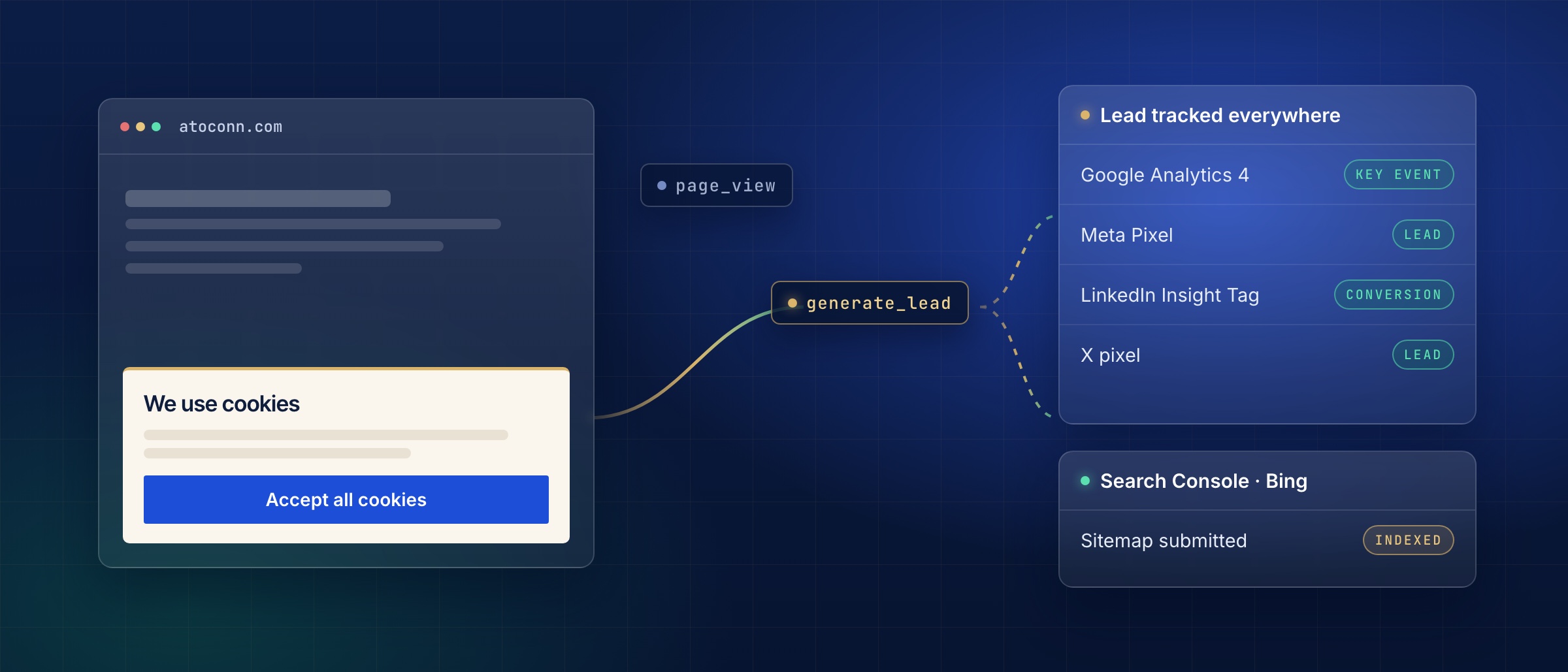
India's Digital Personal Data Protection Act expects visitors to be told what is collected and to agree before optional tracking starts. On our site nothing that measures visitors loads until someone presses "Accept all cookies".
- Write a cookie policy that names every tool you use and what each one is for.
- Add a short banner with one clear "Accept all cookies" button and a link to the policy.
- Load no analytics or marketing code until the visitor accepts.
- Add a "Cookie settings" link to the footer so people can turn cookies off as easily as they turned them on.
- Test it in a private browser window: before you accept, no tracking requests should leave the page.
Why it helpsYou stay on the right side of the law, visitors trust the site, and every number you collect afterwards comes from people who agreed to it.
2. Measure the moments that matter
Page views on their own say little. What matters is the moment a visitor becomes a lead. On our site every form, whether a contact enquiry, a booking request, a demo, a support request or a job application, sends one "lead" event to Google Analytics 4.
Microsoft Clarity adds heatmaps and session replays, with form fields masked, so we can see where a page is hard to use instead of guessing.
- Create a Google Analytics 4 property and a web data stream for your domain, with enhanced measurement switched on.
- Send one lead event (we use generate_lead) each time any form is sent successfully.
- In Admin, mark that event as a key event so it is reported as a conversion.
- Add events for the steps before a lead, such as opening a booking form or sharing an article.
- Send a test form and watch it arrive in the Realtime report.
Why it helpsYou see which pages, searches and posts produce enquiries, not just visits, so time and budget go to what actually brings business.
3. Connect the platforms you post on
If you post or advertise on Facebook, Instagram, LinkedIn or X, each platform needs its own small piece of code on your site to know which of its visitors went on to enquire. We installed the Meta Pixel, the LinkedIn Insight Tag and the X pixel, each receiving the same lead event.
- Meta: create a pixel (dataset) in Events Manager and copy its ID.
- LinkedIn: open Campaign Manager, set up the Insight Tag and copy the partner ID; create an event-specific conversion for leads.
- X: create a pixel and a lead event in Events manager and copy both IDs.
- Load each one only after cookie consent, and send your lead event to all of them.
- Keep secret keys such as conversion API tokens on your server, never in website code.
- Check each platform's test tool shows a page view and a lead from your test form.
Why it helpsEach platform can tell you which posts and ads led to enquiries, and can show your updates to people who already know you, so every rupee of ad spend works harder.
4. Make every link look right when shared
When someone shares a page on LinkedIn or WhatsApp, the preview card is often the first thing a buyer sees of your business. We gave every page, article, case study and job opening its own branded preview.
- Create a 1200 × 630 preview image for each important page, with that page's headline.
- Set the page's share title, description and image tags (Open Graph and X card tags).
- Add share buttons to articles and case studies.
- Tag every link you post with its source, for example ?utm_source=linkedin&utm_medium=social.
- Use a tagged link in each social profile's bio.
- Refresh old previews with LinkedIn Post Inspector and Facebook's Sharing Debugger.
Why it helpsMore people click links that look professional, and the tags tell you which platform actually sends visitors and leads.
5. Help search engines find one version of you
Google Search Console and Bing Webmaster Tools show which searches find you and flag problems early. Behind them sit a few basics that decide whether your pages are found at all.
- Verify your domain in Google Search Console with a DNS record, then import it into Bing Webmaster Tools.
- Submit a sitemap that lists only real, finished pages.
- Redirect the http and non-www versions of your site to one address.
- Give every page a title that says what it offers, in about 60 characters.
- Keep empty or placeholder pages out of search until they have content.
Why it helpsSearch engines rank one strong version of each page instead of several weak copies, and you can see which searches bring buyers to you.
How we can help
We set this up for clients as part of our Digital Marketing and Web Strategy work: consent banner and cookie policy, Google Analytics, Search Console and Bing, the Meta, LinkedIn and X pixels with lead events, branded share previews and tagged links, and a short report showing where enquiries come from.
If your site is live but you cannot yet say what it earns, our Visibility Audit is the place to start: five to seven days, ending in a ranked list of what to fix first.